|
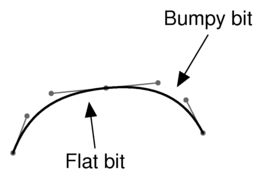
Music: The Geeking For the benefit of anyone who's interested and who hasn't already had me talk their ears off about this, here's a discussion of the techniques I used to design the music font I've been talking about recently. I've known for some time that I'm not good at font design. At least, not scalable font design. I was OK at font design back in the 8-bit and 16-bit days, when you were typically drawing each character as an 8×8 or 8×16-pixel bitmap; in those days, the question of getting a curved line to look just right was a nice bounded question in which you typically had three or four pixels you could choose to flip one way or the other, and it didn't take long to try all the possibilities and decide which you liked best. By comparison, scalable fonts give you a terrifying amount of choice. Even once you've decided that you want (say) a curve which has one end meeting this point horizontally and the other meeting that point vertically, there's still an uncountable number of degrees of freedom (in principle) involved in picking a particular curve. You can set down sanity constraints until you're blue in the face – specify the second derivatives, constrain the rate of change of curvature, require ever more stringent continuity criteria, you name it – and still you haven't cut down the space of possibilities to the point where there's a small enough number to look at them all and pick one. In all my previous efforts to design scalable fonts, this problem has hamstrung me from the word go. I always ended up with my curves looking wrong: a bit too flat here, a bit too sharply curved there, generally uneven. And no matter how I tinkered with the design, I could never seem to produce curves I was happy with – the space of possibilities was just too big, and there was no reliable way to converge within it towards the sorts of curves I wanted. So this time round, I thought for a while about the problems I'd had in previous attempts. This thinking took me a long way into the rather muddy ground that lies half way between mathematics and aesthetics, but – rather to my own surprise – I emerged with something that actually seems to have turned out worthwhile. The file formats in which digital fonts are stored typically describe the glyphs' outlines using a combination of straight lines (the easy bit) and Bézier curves. Font design tools, therefore, generally follow that lead and provide a convenient user interface for specifying glyph designs in terms of Bézier curves. My fundamental conclusion, after trying to design fonts using this method and thinking about why I failed, was this: Bézier curves are not a good tool for font design. They're a good choice for the ‘executable’ form of a font, by which I mean the form that gets fed to rendering engines to actually draw text in the font efficiently. Bézier curves have useful mathematical properties that make them easy to scale, shear and otherwise transform, and they're efficient to render. And they're fully general, in the sense that you can approximate any (reasonably sensible) continuous curve you like with a series of Béziers. So I have no criticism of the fact that all the major scalable font formats (Type 1, TrueType, OpenType) use some variant of Béziers to specify glyph outlines. It's just that they're not a good way to design an outline, if you haven't already got one you're trying to approximate. The sorts of curves you can achieve easily by dragging Bézier control points around don't map well on to the sorts of curves I find I actually want to produce during font design. Sure, the generality property means that in principle I ought to be able to find a connected series of Bézier curves that's close enough to the Platonic ideal curve I had in my head (if I was lucky) – but actually, finding the best set of curves is a nontrivial job even for a computer program searching lots of possibilities blindingly fast, and not really feasible at all if you're an ordinary human dragging control points about one at a time with the mouse. So what's wrong with Bézier curves for this purpose? Well, I think it has to do with the fact that they're parametric. A Bézier curve is specified by imagining a point moving around the plane, in such a way that its x– and y-coordinates at any given moment are defined as cubic functions of time. Then the curve is defined as the path traced out by that point during a particular time interval. Now the thing about cubics – like all polynomials – is that they tend to go whizzing off to infinity very fast at both ends. So if you look at the way the point moves with respect to time, you'll generally find that it accelerates without bound at each end of its path, and slows down in the middle to turn corners. As a result, the path it traces out on the page (once the time dimension is forgotten about) will tend to be straighter at the endpoints and more sharply curved in the middle. Stringing several such curve segments together will therefore tend to lead to uneven curvature, with sticking-out bits where each Bézier slows down to turn corners, and flattish bits where they speed up again at the ends. 
(Of course you can find Bézier curves that avoid this problem – computer tools for curve approximation do it all the time. It's just that, as I said above, the fact that it's theoretically possible doesn't make it easy or natural to get right when you're manipulating the curves by hand.) To put it another way, Bézier curves concentrate too hard on giving their moving point smooth kinematics with respect to their arbitrary time parameter, when they should instead be giving it smooth kinematics with respect to something that's still visible in the final output – such as, for instance, distance along the curve. So this all suggested to me that I'd prefer to be using curves defined in terms of curvature, arc length and intrinsic coordinates (meaning the general idea of defining your curve by imagining you're driving along it at constant speed and changing your direction of travel in ways that are reasonably natural) rather than in terms of some invisible arbitrary parameter. ![[livejournal.com profile]](https://www.dreamwidth.org/img/external/lj-userinfo.gif) ptc24 suggested, separately to that, that I should perhaps consider the sorts of motions made when drawing a glyph by hand, and try to find a family of curves that match that reasonably well. So I thought about that too, and it occurred to me that an obviously natural thing to do is to rest the heel of one's hand on the paper while the pen pivots about that point, giving rise to a basically circle-like sort of curve – but then the fingers can move the pen relative to that circular ‘baseline’, so that for instance you can end up with a more spiral-like curve as the pen-to-pivot distance varies. ptc24 suggested, separately to that, that I should perhaps consider the sorts of motions made when drawing a glyph by hand, and try to find a family of curves that match that reasonably well. So I thought about that too, and it occurred to me that an obviously natural thing to do is to rest the heel of one's hand on the paper while the pen pivots about that point, giving rise to a basically circle-like sort of curve – but then the fingers can move the pen relative to that circular ‘baseline’, so that for instance you can end up with a more spiral-like curve as the pen-to-pivot distance varies.
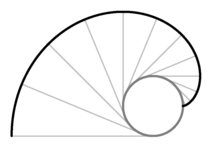
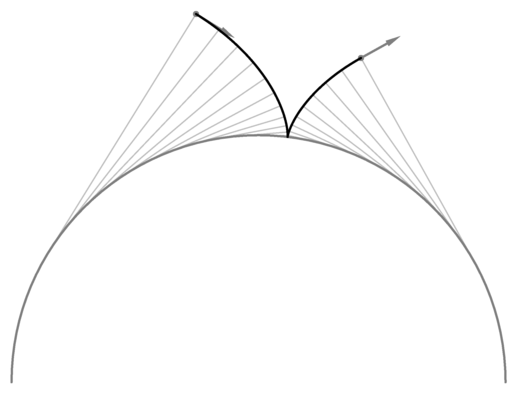
The conjunction of the idea of spirals and that of curves with simple curvature-based definitions reminded me that there was a curve family which I already knew about and which falls into both categories: involutes of circles. The involute of a circle is a type of spiral which is most easily described by imagining wrapping a piece of thread tightly round your circle, and then unwinding it while keeping the thread taut. The curve traced out by the end of the thread (suppose you tied a little loop at the end of the thread and stuck your pen point through the loop) is an involute. 
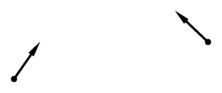
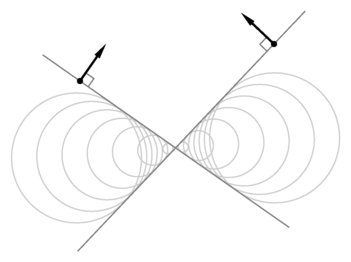
So this clearly has the spirally property I was looking for: if you draw the whole of an involute of a circle, it's a spiral with essentially constant distance between successive turnings. And involutes are indeed naturally expressed in intrinsic coordinates: at any point on the curve, the centre of curvature is the place where the thread currently leaves the circle, and the radius of curvature is equal to the amount of thread you've so far unwrapped, and hence changes at constant speed with respect to the angle of the curve. A further useful property is that actual circular arcs drop out of the construction as a limiting special case (if you let the inner circle shrink to a point). The next question was whether it's sensibly feasible to use involutes as a curve primitive in font design. In order to do that, I'd need a means of treating them similarly to Bézier curves: rather than having to specify them by means of defining a circle and a thread length, I'd want to be able to simply specify two endpoints and some information about what the curve needed to be doing at those endpoints, and have some software automatically find me the right parameters for a segment of involute fulfilling those criteria. This didn't turn out to be too hard: given two endpoints and a desired direction at each endpoint… 
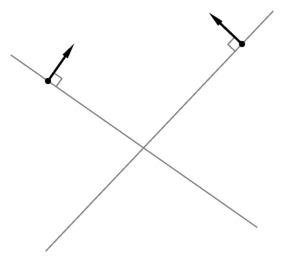
you can draw the normal to the curve at each end… 
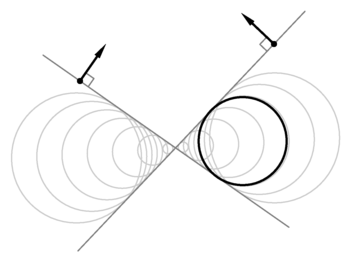
… and then both those normals have to be tangent to the inner circle. 
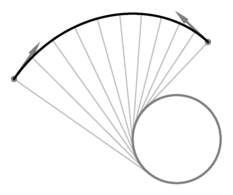
So it's just a matter of picking the circle's radius such that the distance round its circumference is equal to the difference between the distances from each curve endpoint to the corresponding circle tangent point, which turns out to be a nice easy linear equation. 
Then you can draw your involute. 
Having worked all that out, I implemented it in a small curve-design tool with minimal user interface, and started actually trying to draw glyphs with it. The results were good – in fact, surprisingly good for such a dangerously long flight of pure supposition. I tried drawing a few glyphs twice, once with involutes and once with Béziers, and I generally found I needed about twice as many Bézier segments as involute segments to get the curves looking about right. Also, each Bézier segment has two more degrees of freedom than each involute segment (with involutes you can only specify a curve direction at each endpoint, whereas Béziers let you specify a speed at each end as well), so in a long chain of the things I'd expect to have about 3/10 as many degrees of freedom to get right using involutes. (For each extra involute you have to define one more endpoint and direction, which is three degrees of freedom; for each extra Bézier you need two speeds as well for five degrees of freedom, and then you need two Béziers which doubles that.) Each extra degree of freedom introduces the possibility of accidentally putting an ugly lump in the curve, so at high magnification the Bézier versions tended to look worse even after I used enough of them to get the glyph looking right at normal size. In other words, I had achieved precisely what I set out to: I had found a family of curves which greatly reduced the number of degrees of freedom I needed to get just right, and yet which still contained nearly all the sorts of curve that I actually wanted to end up with. All I lost was a large number of opportunities to make errors. And that's the basis on which nearly all the glyphs in my music font are defined. Typically a chain of involute segments (and a few straight lines, and just occasionally a Bézier turned out to be the right tool after all for some particular job) is used to define the centreline of a stroke, and then I hand-typed mathematical formulae defining how each stroke should be drawn with a ‘pen nib’ of varying width and shape. That last part is still rather ad-hoc, but it worked well enough for this one project; if I were to expand the whole business into a serious reusable font design tool, I'd probably have to provide a more sensible user interface for specifying the variation of nib widths and shapes. There are still a few caveats when using involutes in this way. For a start, the procedure I described above for picking an involute given two endpoints and direction vectors doesn't guarantee to produce a sensible smooth curve. One failure mode is that the thread being wrapped around the circle might pass through zero length in the middle of the curve and go negative – in which case the resulting curve seems to ‘bounce off’ the invisible circle in mid-flight, and ends up approaching the endpoint from precisely the wrong direction. 
If this happens, you just have to try specifying your curve in a different way, or use more segments, or (if you really have no alternative) resort to a Bézier. Also, being fundamentally based on circles and curvature, involutes aren't as agnostic about aspect ratio as Béziers. They do very well at drawing shapes that are essentially ‘circle-like’ (not necessarily actually circular, but having some sort of essential quality that's close to invariant under rotation), but for anything ellipse-like they do very badly indeed. One particular glyph caused me a lot of trouble on this score, which was the 8 used in time signatures. The 8 has to be the same width as the other digits, but its two bulbs are shorter than the single bulb of (say) a zero; this means it has an ellipse-like short squat oblate look, and as a result my first few attempts to draw it with involutes failed miserably. Eventually I worked out what the problem was, and solved it by horizontally squashing the coordinate system a bit so that the two bulbs of the 8 became more round-ish; then, suddenly, the involutes were going precisely where I wanted them to go, and I was able to draw an 8 I was happy with. Then I postprocessed it by re-expanding the coordinate system. | ![[personal profile]](https://www.dreamwidth.org/img/silk/identity/user.png)